
Appearance
Advanced Form Configuration
User inputs can react to each other, to the entity the action runs on, and to the user running it — the same model as Port's advanced form configurations. Everything below lives in the workflow's trigger.userInputs and can be set either from the User Inputs builder (open an input → Advanced) or in Edit JSON mode.
Wherever a value is marked jqQuery-able you can write either a constant or { "jqQuery": "<expression>" }. Expressions are evaluated on the server (same jq engine as step templating) every time the form changes.
jq context
| Key | Contents |
|---|---|
.form | the current values of the form (.form.environment). For format: "entity" inputs this is the selected entity — { identifier, title, blueprint, properties, relations } — so use .form.cluster.identifier, .form.cluster.properties.region or .form.cluster.relations.team |
.entity | the target entity for DAY-2 / DELETE actions — identifier, title, blueprint, properties, relations; null for CREATE actions |
.user | who is filling the form — userId, email, name, teams (identifiers of the catalog _team entities owning the user's _user entity) |
Dependencies between inputs — dependsOn
json
{
  "cluster": {
    "type": "string",
    "format": "entity",
    "blueprint": "cluster",
    "dependsOn": ["environment"]
  }
}
cluster is disabled until environment has a value. When environment is cleared again the cluster value is cleared too. Set dependsOn on any input whose rules reference .form.<other input>.
Show / hide and disable — visible, disabled
json
{
  "reason": {
    "type": "string",
    "title": "Reason",
    "visible": { "jqQuery": ".form.environment == \"prod\"" }
  },
  "runbook": {
    "type": "string",
    "disabled": { "jqQuery": ".user.email | endswith(\"@platform.io\") | not" }
  }
}
Both accept a boolean ("visible": false always hides) or a jqQuery returning a boolean. Hidden inputs are never submitted and are never required; disabled inputs are read-only but their value (typically a default) is submitted.
Dynamic required, enum and default
json
{
  "required": {
    "jqQuery": "if .form.environment == \"prod\" then [\"environment\", \"reason\"] else [\"environment\"] end"
  },
  "properties": {
    "environment": { "type": "string", "enum": ["dev", "staging", "prod"] },
    "runtime": {
      "type": "string",
      "enum": {
        "jqQuery": "if .form.language == \"python\" then [\"3.11\", \"3.12\"] else [\"node18\", \"node20\"] end"
      },
      "dependsOn": ["language"]
    },
    "tags": {
      "type": "array",
      "default": { "jqQuery": ".entity.properties.tags" }
    }
  }
}required(form level) — a jqQuery must return an array of input identifiers.enum— a jqQuery must return an array; the dropdown re-renders as the form changes.default— evaluated once when the form opens (handy for DAY-2 actions pre-filled from.entity).
enum can also depend on who is filling the form. .user.teams is the list of team identifiers the user belongs to, so a dropdown can offer different values per team — the platform re-checks the resolved list when the run starts, so a value that was not offered is rejected even if submitted through the API:
json
{
  "environment": {
    "type": "string",
    "title": "Environment",
    "enum": {
      "jqQuery": "if any(.user.teams[]?; . == \"admin\") then [\"dev\", \"staging\", \"prod\"] elif any(.user.teams[]?; . == \"developer\") then [\"dev\", \"staging\"] else [] end"
    },
    "default": {
      "jqQuery": "if any(.user.teams[]?; . == \"admin\") then [\"dev\", \"staging\", \"prod\"] elif any(.user.teams[]?; . == \"developer\") then [\"dev\", \"staging\"] else [] end | first"
    }
  }
}
any(.user.teams[]?; . == "admin")is true when the user is in theadminteam ([]?keeps it safe when the list is empty). An empty array leaves the dropdown disabled for everyone else.- Piping the same expression into
| firstgives a matchingdefault(nullwhen nothing is offered, which leaves the field empty). - Team identifiers are the team names from Admin → Users and teams; see Deploy Selected Services for the demo that uses this.
Filtering entity inputs — dataset
json
{
  "cluster": {
    "type": "string",
    "format": "entity",
    "blueprint": "cluster",
    "dependsOn": ["environment"],
    "sort": { "property": "$title", "order": "ASC" },
    "dataset": {
      "combinator": "and",
      "rules": [
        { "property": "env", "operator": "=", "value": { "jqQuery": ".form.environment" } },
        { "property": "$team", "operator": "containsAny", "value": { "jqQuery": ".user.teams" } },
        { "property": "archived", "operator": "isEmpty" },
        { "relation": "region", "operator": "in", "value": ["eu-west", "eu-central"] },
        { "operator": "relatedTo", "blueprint": "service", "value": { "jqQuery": ".entity.identifier" } }
      ]
    }
  }
}
The entity picker is a searchable dropdown: the text you type is matched on title/identifier and combined with the dataset rules server-side (POST /blueprints/:bp/entities/search). While a rule references an input that is still empty the picker shows "Fill in … first".
Chaining entity inputs
Because .form.<entityInput> is the selected entity, one picker can be narrowed by another one:
json
{
  "cluster": { "type": "string", "format": "entity", "blueprint": "cluster" },
  "service": {
    "type": "string", "format": "entity", "blueprint": "service",
    "dependsOn": ["cluster"],
    "dataset": {
      "combinator": "and",
      "rules": [
        { "relation": "cluster", "operator": "=", "value": { "jqQuery": ".form.cluster.identifier" } },
        { "property": "region", "operator": "=", "value": { "jqQuery": ".form.cluster.properties.region" } },
        { "property": "$team", "operator": "containsAny", "value": { "jqQuery": "[.form.cluster.relations.team]" } }
      ]
    }
  }
}
relations hold the target entity identifiers (a string, or an array when a relation has several targets). If a rule value resolves to a whole entity (e.g. .form.cluster), its identifier is used.
Rule shape
| Key | Meaning |
|---|---|
property | a blueprint property, or a meta property: $title, $identifier, $blueprint, $team (owning team identifiers) |
relation | instead of property — filters on the identifier of the related entity |
operator | see below |
value | constant or { "jqQuery": … }; omitted for isEmpty / isNotEmpty |
blueprint | with relatedTo: restrict to related entities of that blueprint |
Operators
| Operator | Applies to |
|---|---|
=, != | any scalar property, meta properties, relations |
>, >=, <, <= | numbers / dates |
contains, doesNotContains | strings (case-insensitive substring), arrays (membership) |
containsAny | array properties, $team |
beginsWith, endsWith | strings |
in, notIn | scalar properties and relations (value is an array) |
between, notBetween | numbers / dates (value is [min, max]) |
isEmpty, isNotEmpty | any property / relation (no value) |
relatedTo | entities linked (in either direction) to the entity identifier in value, optionally limited to blueprint |
Sorting entity inputs — sort
sort controls the order of the entities in the dropdown, exactly like Port:
json
"sort": { "property": "tier", "order": "DESC" }propertyis either a meta property ($title,$identifier,$createdAt,$updatedAt) or the identifier of a property of the target blueprint.objectandarrayproperties cannot be sorted on.orderisASC(default) orDESC.- When
sortis omitted the entities are sorted by title, ascending. - Entities with no value for the property are always listed last.
In the editor, the Sort entities field under the blueprint selector exposes the same options (meta properties + the blueprint's scalar properties, and the direction).
TIP
Meta properties are ordered by the database. Blueprint properties are stored as JSON and are sorted in memory: the search loads the entities matching the dataset (capped at 5 000) before ordering them, so prefer a dataset filter or a meta property on very large blueprints.
Selecting several entities — type: "array"
An input can accept any number of entities of one blueprint. Port-style, the entity configuration moves onto items and the property itself becomes an array:
json
{
  "repos": {
    "type": "array",
    "title": "Repositories",
    "items": {
      "type": "string",
      "format": "entity",
      "blueprint": "githubRepository",
      "sort": { "property": "$updatedAt", "order": "DESC" },
      "dataset": {
        "combinator": "and",
        "rules": [{ "property": "$identifier", "operator": "in", "value": ["idpnextdemo/orders-service", "idpnextdemo/payments-service"] }]
      }
    }
  }
}items.blueprintis required.datasetandsortwork exactly as above but must sit onitems— putting them on the property is rejected when the workflow is saved.- In the editor, choose Limit → Multiple entities under the blueprint selector; the builder writes the
type: "array"+itemsshape for you. Array inputs have no Default field. - The portal renders a multi-select picker: a searchable checkbox list that stays open while you pick, with the selection shown as chips on the field (
+N moreafter three). - A required array input must contain at least one entity — an empty selection counts as missing.
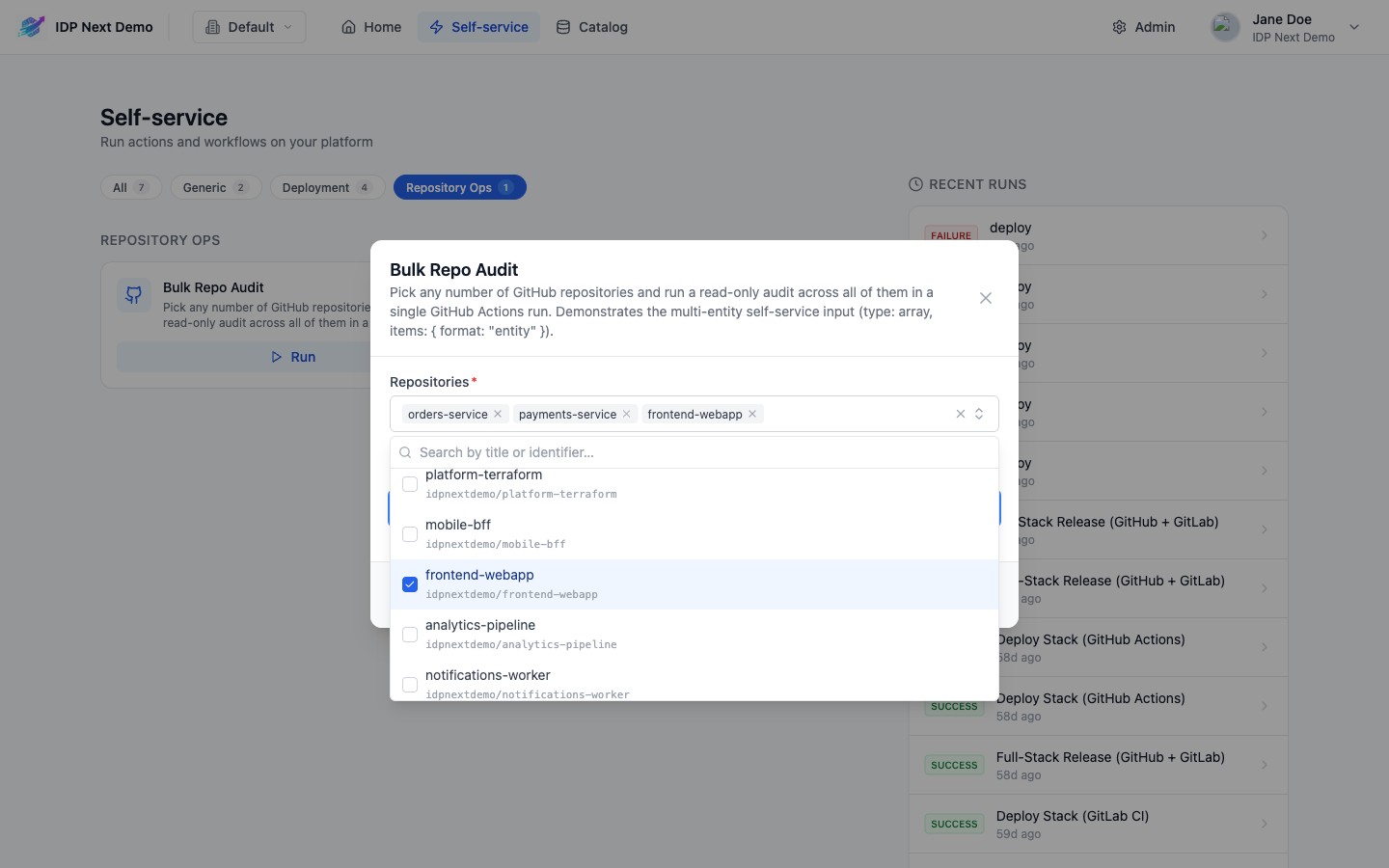
The value is available in two shapes, so pick the right one:
| Expression | .repos is… |
|---|---|
.inputs.repos (step config templates) | an array of entity identifiers (["idpnextdemo/orders-service", …]), in the order they were picked |
.form.repos (form rules — jqQuery in visible, required, dataset, … — and step config templates) | an array of hydrated entities ([{ identifier, title, properties, relations, … }, …]); an identifier that no longer exists is left as a plain string |
The same applies to a single-entity input: {{ .inputs.release }} is the identifier, {{ .form.release.properties.tag }} reads the selected entity. In step templates .form is a snapshot taken when the run starts.
Ocean identifiers carry the owner
Entities synced by Ocean use org/name identifiers. When an external system wants bare names, map them in the template: {{ .inputs.repos | map(split("/") | last) }} → ["orders-service", …]. The same trick works on a single item inside a loop: {{ .item | split("/") | last }}.
See the Bulk Repo Audit and Deploy Selected Services demo workflows for complete definitions.
Full example
json
{
  "order": ["environment", "cluster", "reason"],
  "required": {
    "jqQuery": "if .form.environment == \"prod\" then [\"environment\", \"cluster\", \"reason\"] else [\"environment\", \"cluster\"] end"
  },
  "properties": {
    "environment": { "type": "string", "title": "Environment", "enum": ["dev", "staging", "prod"] },
    "cluster": {
      "type": "string", "title": "Cluster", "format": "entity", "blueprint": "cluster",
      "dependsOn": ["environment"],
      "dataset": {
        "combinator": "and",
        "rules": [
          { "property": "env", "operator": "=", "value": { "jqQuery": ".form.environment" } },
          { "property": "$team", "operator": "containsAny", "value": { "jqQuery": ".user.teams" } }
        ]
      }
    },
    "reason": {
      "type": "string", "title": "Reason for a production deploy",
      "visible": { "jqQuery": ".form.environment == \"prod\"" }
    }
  }
}
Errors and edge cases
- A jq expression that fails (syntax or runtime) never blocks the form: the input falls back to
visible: true/disabled: false, a staticenum/requiredif any, and the form shows an amber "Some form rules could not be evaluated" banner. The failing expression is logged server-side. dependsOnreferencing an unknown input, an input depending on itself, or a cycle is rejected when the workflow is saved.datasetis only allowed onformat: "entity"inputs; unknown operators are rejected on save.- For
type: "array"inputs,items.blueprintis required whenitems.formatis"entity", andsort/datasetmust be onitems— "for an entity array, sort/dataset belong on "items", not the property itself". - The server re-evaluates the form when the run starts: values of hidden or dependency-blocked inputs are dropped and the dynamic
requiredlist is enforced, whatever the client sent.