
Appearance
Blueprints
A blueprint is the schema for a type of catalog entity: its properties (typed, with enums, formats, colors) and its relations to other blueprints. Everything you see in the catalog is an entity of some blueprint.
The data model view
Admin → Data model shows all blueprints and their relations as a graph (the demo has 20+ blueprints, most provisioned automatically by the Ocean exporters):
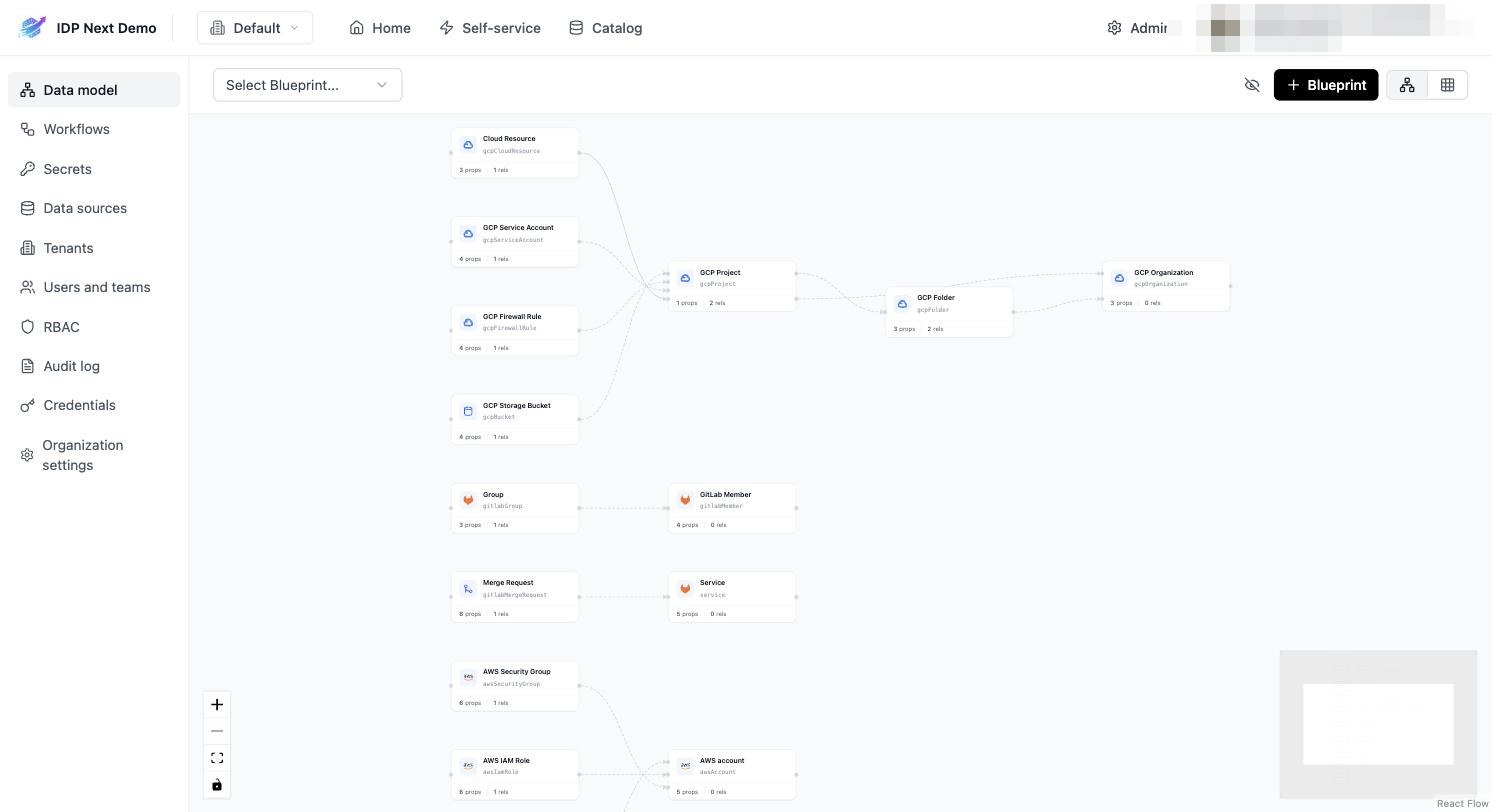
Click + Blueprint to create one in the UI, or create it via API as shown below.
Example 1 — the service blueprint
The demo's service blueprint (GitLab projects are mapped into it by the ingestion):
json
{
  "identifier": "service",
  "title": "Service",
  "icon": "GitLab",
  "schema": {
    "required": [],
    "properties": {
      "url": { "icon": "Link", "type": "string", "title": "URL", "format": "url" },
      "tier": {
        "enum": ["Mission Critical", "Customer Facing", "Internal Service", "Other"],
        "type": "string",
        "title": "Tier",
        "enumColors": {
          "Mission Critical": "turquoise",
          "Customer Facing": "green",
          "Internal Service": "darkGray",
          "Other": "yellow"
        },
        "description": "How mission-critical the service is"
      },
      "readme": { "icon": "Book", "type": "string", "title": "README", "format": "markdown" },
      "language": { "icon": "Git", "type": "string", "title": "Language" },
      "codeowners": { "type": "string", "title": "CODEOWNERS", "format": "markdown" }
    }
  },
  "relations": {}
}
Example 2 — the deployment blueprint
This is the blueprint your self-service workflows will write into (Part 4). Create it exactly like this:
json
{
  "identifier": "deployment",
  "title": "Deployment",
  "icon": "LucideRocket",
  "schema": {
    "required": [],
    "properties": {
      "url": { "type": "string", "title": "Run link", "format": "url" },
      "status": { "type": "string", "title": "Status" },
      "version": { "type": "string", "title": "Version" },
      "provider": { "enum": ["github", "gitlab", "mixed"], "type": "string", "title": "Provider" },
      "services": { "type": "array", "title": "Services" },
      "workflow": { "type": "string", "title": "Workflow" },
      "environment": { "enum": ["dev", "staging", "prod"], "type": "string", "title": "Environment" },
      "triggeredBy": { "type": "string", "title": "Triggered by" }
    }
  },
  "relations": {}
}
Creating blueprints via API
bash
curl -X POST "https://<your-idp-domain>/api/v1/blueprints" \
  -H "Authorization: Bearer $TOKEN" -H "Content-Type: application/json" \
  -d @deployment-blueprint.json
Property types cheat sheet
type:string,number,boolean,array,objectformat(for strings):url,markdown,email,date-timeenum+enumColors: dropdown values rendered as colored badgesrelations:{ "team": { "target": "team", "many": false } }links entities together — related entities appear on the entity page and in the data model graph
Relations need existing targets
If an entity is created before the entity its relation points to, the relation is silently skipped. Re-run the sync (or PATCH the entity) once the target exists.